a blue abstract background with wavy lines

UX Case Study

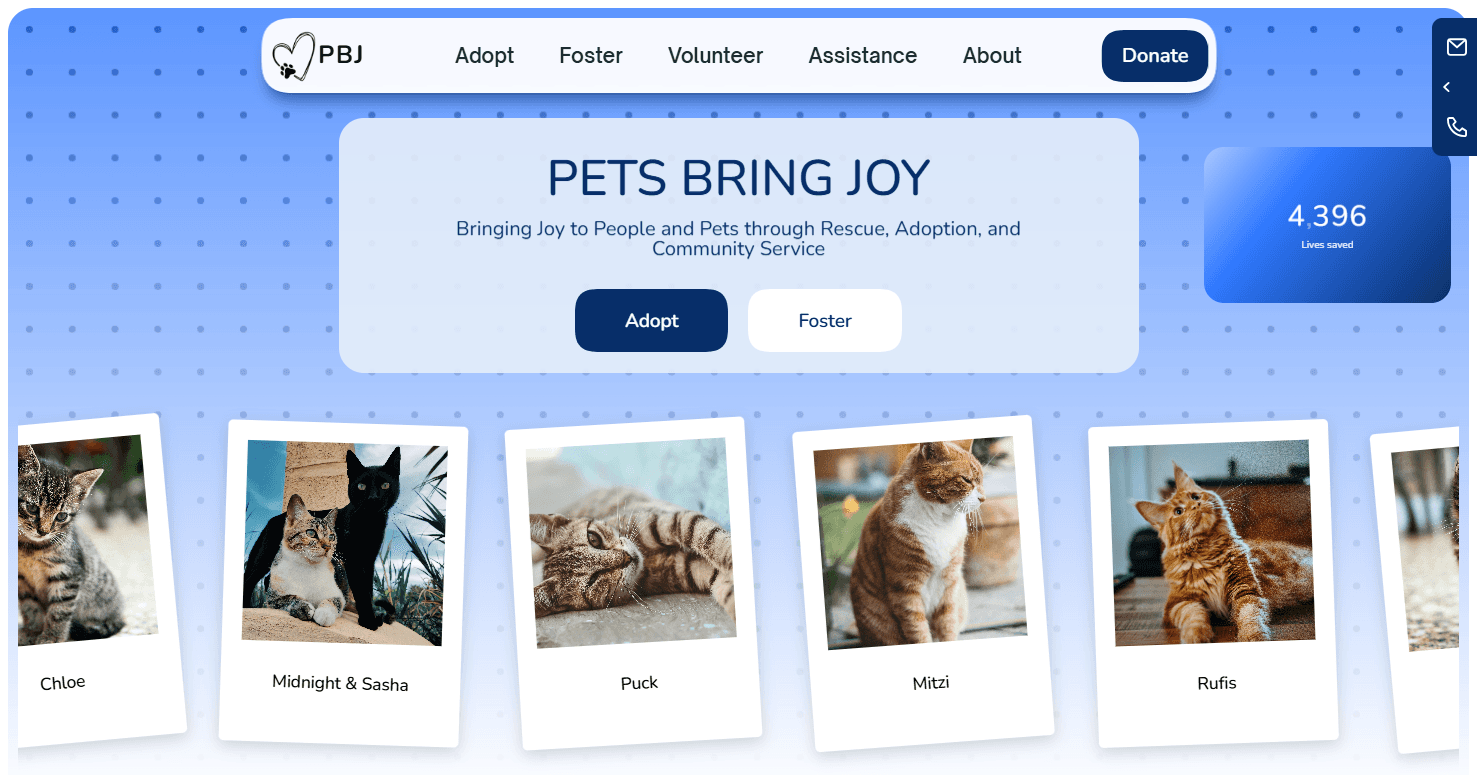
PETS BRING JOY

Website Redesign

↑ 18% estimated adoption application conversion

0
1
2
3
4
,
0
1
2
3
0
1
2
3
4
5
6
7
8
9
0
1
2
3
4
5
6

Lives saved

My Role

Design Lead · Research · Prototyping

Timeline

Six Weeks

Product

A 501(c)(3) cat rescue website serving Northern Virginia / DC metro. 4,396 animals placed since 2013. 331 adoptions in 2025.

Discover

Define

Prototype

Iterate

Outcome

WELCOME

TO

THE NEW

WELCOME

TO

THE NEW

WELCOME

TO

THE NEW

PROBLEM FRAMING

Problem Statement

The current design creates friction with users due to slow load speeds, ambiguous users flows, and text-heavy pages. The site feels more like a brochure than a pet adoption website. As a result, users struggle to understand what to do next, where to find adoptable cats, and how the process works. This leads to high drop-offs and users seeking out other means of adoption with either PBJ's social media or a different organization altogether.


The organization does a great job of getting cats adopted, my goal is improve those numbers by redesigning the website into the tool that it was always meant to be and find more cats the loving homes they deserve.

Critical Problems

No clear adoption funnel

Users overwhelmed by options and no clear CTA above the fold.

mobile-phone
mobile-phone

Not mobile-friendly

Tiny/unreadable text, not touch-friendly, forms aren't optimized.

🐢

Slow loading speeds

Users wait 5-10 seconds for pages to load.

glowing-star
glowing-star

No clear mission

Not clearly stated on the main page that they exclusively focus on cats

Not clear that they only focus on cats

💳

💳

No online donation

Only a mail-in-PO-Box option loses donations for inconvenience.

Mail-in only option loses donations for inconvenience.

responsive
responsive

No Design system

Oversized images, inconsistent spacing/padding/margins,

Impactful Solutions

Fast loading speeds

Use compressed images, minimize content, and host with Framer.

mobile-phone
mobile-phone

Mobile-friendly

Flexible grid, touch-friendly CTAs, mobile design UI best practices.

Clear adoption funnel

CTA above the fold with cat images and user-friendly navigation.

💳

Online donation option

Easy online payment with a variety of options.

responsive
responsive

Optimized design

Utilize a design system structured with UI design principals.

glowing-star
glowing-star

Clear mission

Mission statement and about sections moved to home page.

INDEX

1
1
1
Discover
  • Problem

  • Role, Scope, Approach

  • Background

  • Problem

  • Role, Scope, Approach

  • Background

  • Problem

  • Role, Scope, Approach

  • Background

2
2
2
Define
  • Research

  • Definition

  • Direction

  • Research

  • Definition

  • Direction

  • Research

  • Definition

  • Direction

3
3
3
Prototype
  • UXUI Design

  • Prototyping

  • UXUI Design

  • Prototyping

  • UXUI Design

  • Prototyping

4
4
4
Iterate
  • User Testing

  • Iteration

  • User Testing

  • Iteration

  • User Testing

  • Iteration

5
5
5
Outcome
  • Impact

  • Closing Statements

  • Impact

  • Closing Statements

  • Impact

  • Closing Statements

DISCOVER

Problem | Role & Scope | Context & Background

Role, Scope, Approach | Context/Background

DISCOVER

Problem | Role & Scope | Context & Background

ROLE & SCOPE

MY ROLE

ROLE

Originally this was a two-week case study from my boot camp at GW University.

The requirements called for a full UX work-up with a high fidelity desktop mock-up of the home page.

Being a team player, I volunteered to do the UX research and didn't get to do much front end/UI design.

In this case study I did a full redesign from start to finish utilizing original UX

along with modern UI design best practices.

SCOPE

What I Owned


✓ Full UX audit of existing site

✓ Competitive analysis

✓ Information architecture redesign

✓ User flows and wireframes

✓ Design system

✓ High-fidelity prototype

✓ Usability testing

✓ Custom-built design in Framer

✓ SEO implementation

What I Didn't


• Adoption cards (PetFinder widget)

• Content (PBJ team provided copy)

• Photography (Unsplash/PBJ's)

• SEO implementation (handled post-handoff)
CONTEXT & BACKGROUND

CONTEXT/
BACKGROUND

Product ecosystem

Product ecosystem

PBJ Digital Ecosystem

PBJ Digital Ecosystem

PBJ's digital presence is scattered.

Which can make users feel like they are trying to herd kittens when searching for information.

PBJ's digital presence is scattered.

Which can users feel like they are trying to herd kittens when searching for information.

The website plays a major roll as the central hub within the ecosystem. It's the "digital kitten shepherd" keeping all the information for users together one place.

PETSBRINGJOY.COM — DIGITAL SHEPHERD

f

Facebook

Adoptable Cat Posts

Instagram

Success Stories

P

Petfinder

Adoption Listings

PetSmart Events

In-Person Adoptions

Clarification - Not Confusion

Adoption

Clear adoption path

eliminates confusion

PBJ Application

Clearly state that PBJ uses a robust application process to boost success rate

Donations

Streamlining the donation process ensuring ease of use

Recurring tiers

+

Impact stats

Events

Establish better clarity on when and where adoption events occur

Integrated calendar

+

RSVP on site

Addressing all major user pain points ensures ease of use.
- Decreasing bounce rates and increasing adoption rates.
Addressing all major user pain points ensures ease of use.
- Decreasing bounce rates and increasing adoption rates.

DEFINE

Research | Define | Direction

RESEARCH

Methods used:

  • Heuristic evaluation

  • Surveys

  • Analytics review

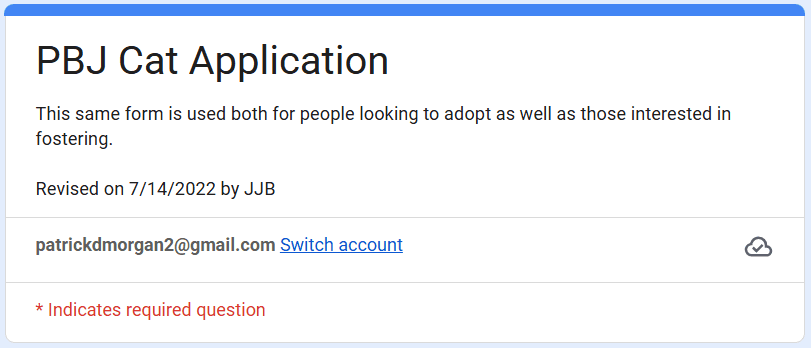
Heuristic Evaluation
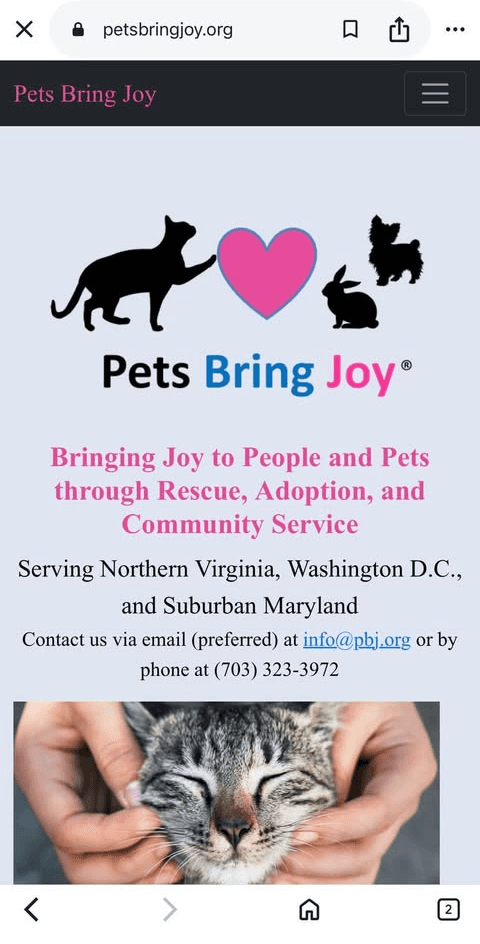
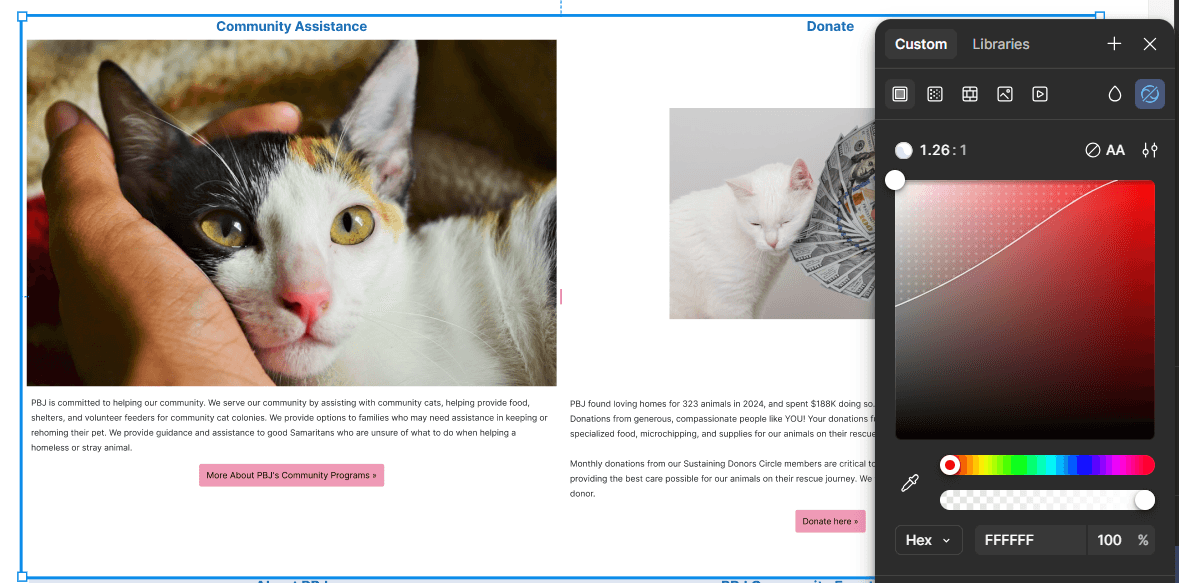
Logo

too large

Logo

too large

Hero image

too large

Hero image

too large

Confusing navigation menu

Confusing navigation menu

No clear call to

action above

the fold

No clear

call to

action

above

the fold

Logo

Not needed

& too large

Logo

Not needed

& too large

Image not

above the

fold

Image not

above the

fold

9:41

9:41

Centering

Margins, and spacing,

are all inconsistent.

Margins,

spacing,

and centering

are all

inconsistent.

User Needs

User Needs

User Needs

Hasn't been updated

since 2022

Hasn't been updated

since 2022

Fails contrast test

Fails contrast test

Fails contrast test

Top Findings

Top Findings

Increased Cognitive Load

Increased Cognitive Load

Increased Cognitive Load

Users must think harder to figure out basic interactions

Users must think harder to figure out basic interactions

An unclear user path causes too much guess work.

Eroded Trust

Eroded Trust

Eroded Trust

Inconsistent design makes the site look unpolished, unprofessional, or even abandoned

Inconsistent design makes the site look unpolished, unprofessional, or even abandoned

Inconsistent design makes the site look unpolished, unprofessional, or even abandoned.

Abandonment Rates

Abandonment Rates

Abandonment Rates

Frustration from broken user flows and hidden information increases drop off

Frustration from broken user flows and hidden information increases drop off

Frustration from broken user flows and hidden information increases drop off dramatically.

Survey

Survey Questions

Survey Questions
  1. What was the most frustrating or confusing part of the adoption process?

  1. How likely would you recommend Pets Bring Joy to a family member, friend, or colleague? (Likert scale from “very unlikely” to “very likely”)

  1. On a scale from 1–10, how would you rate the visual design and layout of the PBJ website?

  1. How would you describe the process of adopting from PBJ? (Likert scale from “not easy at all” to “very easy”)

Analytics Review
What was Learned
What was Learned

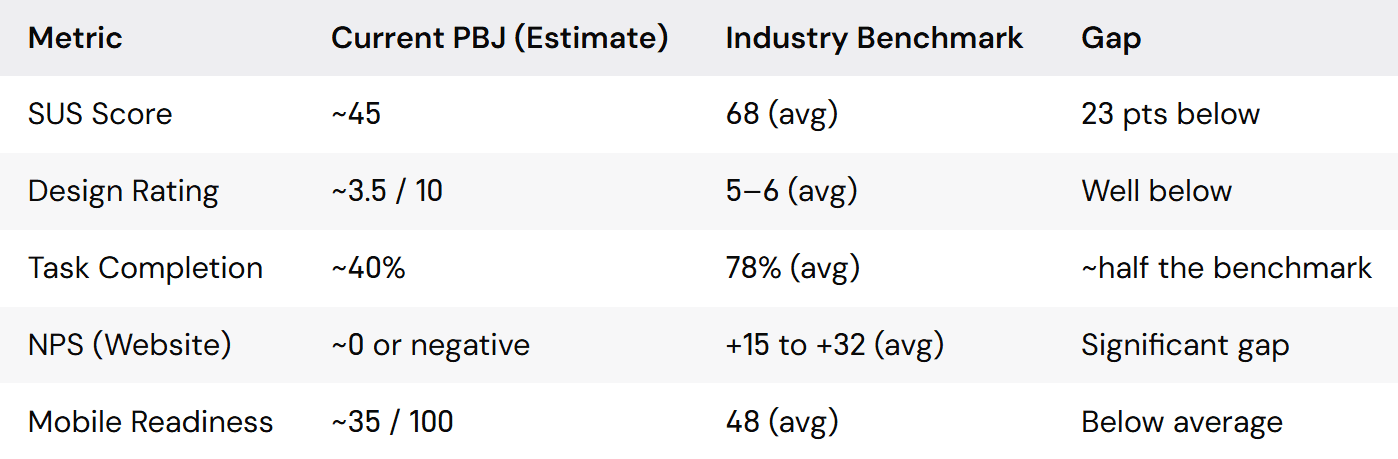
Plugging in the data from the survey to a scoring table allows us to take the redesign from a subjective "make it better" into a data-driven "close these specific gaps" answer key.


If the redesign moves SUS to 68+, task completion to 80%+, and mobile readiness to 80+, we've quantifiably fixed user pain points and can continuously track this data in the future.


These are all speculative numbers because I don't have access to the actual analytics on the current site, however this is good practice for implementing the data we do have into desirable quantifiable data.
SUS Score (System Usability Scale) NPS (Net Promoter Score)

DEFINE

Turning Research into Design Decisions

Criteria:

User needs & Problem Statements

DEFINE
Turning Research into Design

Turning Research into Design Decisions

Criteria:

User needs & Problem Statements

User Needs

"I want to see cats before I apply"

"I want to see where my donation goes"

"I want a faster response after I apply"

"I want to an easier way to donate"

Problem Statements

PBJ's current site underperforms across every measurable aspect, but the most critical gap is task completion.


Only ~40%(estimated) of users can successfully find and apply for a cat, compared to a 78% industry average. That's not a visual problem, it's a critical failure. The site is actively losing more than half its potential adopters before they ever see a cat.


The SUS score (~45) puts the site in the "low usability" range. Users find it frustrating, not just dated . And the near-zero or negative NPS suggests the digital experience is hurting PBJ's reputation, even though the rescue itself does excellent work.

IDEATION

Criteria:

Concepts & Directions

DEFINE
Turning Research into Design

Criteria:

Concepts & Directions

Fix the adoption flow first

Fix the adoption flow first

Task completion is the biggest gap. Making cats visible and the application path clear is paramount.

Task completion is the biggest gap. Making cats visible and the application path clear is paramount.

Mobile is non-negotiable

Mobile is non-negotiable

A score of 35/100 means mobile users are having a bad experience, and that's where most pet discovery happens.

A score of 35/100 means mobile users are having a bad experience, and that's where most pet discovery happens.

UI that converts

UI that converts

Establishing trust with user stories, using UI best practices for professional appearances, and especially for easing the user experience

Establishing trust with user stories, using UI best practices for professional appearances, and especially for easing the user experience

PROTOTYPING

UX Design | UI Design | Prototype

PROTOTYPING

UX Design | UI Design | Prototype

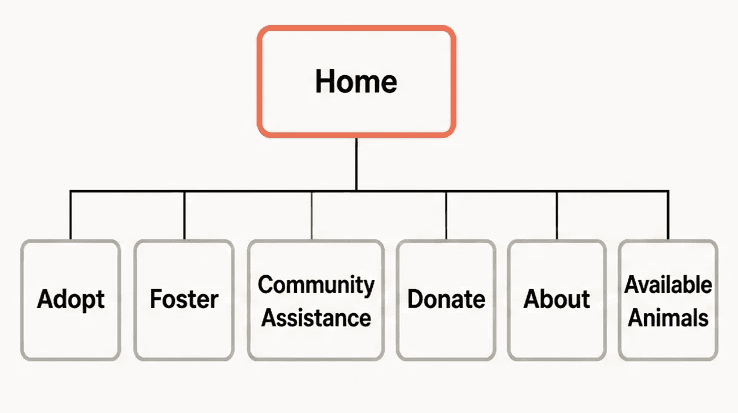
UX DESIGN


Before

After

Home

Donate + Contact + Adoptable cats + Events + Stats + CTA + Sponsors

Adopt

Browse cats

Adoption Process

Adoption Application

Foster

Foster

Process

Foster Appplication

About

Mission & Team

Success Stories

Impact

Stats & Reports

Assistance

Lost & Found

Volunteer

Rehome/

help of any kind

Donate

One-Time

+

Monthly/Yearly Tiers

Other Ways to Give

Critical Problems

Slow loading speeds

Slow loading speeds

Users often have to wait 5-10 seconds for pages to load.

Users often have to wait 5-10 seconds for pages to load.

mobile-phone
mobile-phone

Not mobile-friendly

Not mobile-friendly

Tiny/unreadable text, not touch-friendly, forms aren't optimized.

Tiny/unreadable text, not touch-friendly, forms aren't optimized.

No clear adoption funnel

No clear adoption funnel

Users overwhelmed by options and no clear CTA above the fold.

Users overwhelmed by options and no clear CTA above the fold.

💳

💳

No online donation

No online donation

Only a mail-in-PO-Box option loses donations for inconvenience.

Mail-in only option loses donations for inconvenience.

Only a mail-in-PO-Box option loses donations for inconvenience.

responsive
responsive

No Design system

No Design system

Oversized images, inconsistent spacing, padding, margins

Oversized images, inconsistent spacing, padding, margins

glowing-star
glowing-star

No clear mission

No clear mission

Not clearly stated on the main page that they exclusively focus on cats

Not clear that they only focus on cats

Not clearly stated on the main page that they exclusively focus on cats

Impactful Solutions

Fast loading speeds

Use compressed images, lazy loading, and minimize CSS/HTML/JS.

Use compressed images, lazy loading, and minimize CSS/HTML/JS.

mobile-phone
mobile-phone

Mobile-friendly

Flexible grid, touch-friendly CTAs, cat-first layout.

Flexible grid, touch-friendly CTAs, cat-first layout.

Clear adoption funnel

CTA above the fold with cat images and condensed navigation.

CTA above the fold with cat images and condensed navigation.

💳

Online donation option

Easy online payment with a variety of options.

Easy online payment with a variety of options.

responsive
responsive

Optimized design

Utilize a design system structured with UI design principals.

Utilize a design system structured with UI design principals.

glowing-star
glowing-star

Clear mission

Mission statement and about sections moved to home page.

Mission statement and about sections moved to home page.

ROLE, SCOPE, APPROACH

MY ROLE

ROLE

This was originally a two week case study from my boot camp.

The requirements called for a full UX work up and a hi-fi mock

up of a desktop home page. I volunteered to do the UX research

so I didn't get to do much UI design.

I chose to redo the case study entirely utilizing some of the

original UX research, however I redesigned the entire site

after discovering more pain points through deeper research.

SCOPE

What I Owned


✓ Full UX audit of existing site

✓ Competitive analysis

✓ Information architecture redesign

✓ User flows and wireframes

✓ Design system

✓ High-fidelity prototype

✓ Usability testing

✓ Custom-built design in Framer

What I Didn't


• Adoption cards (PetFinder)

• Content writing (PBJ )

• Photography (Unsplash/PBJ)

• SEO implementation (post-handoff)

APPROACH

Audit → Research → Define → Design → Validate

PATRICK MORGAN

Researching today to

craft a better tomorrow

Contact
patrickdmorgan2@gmail.com

email

757-515-9252

phone

© 2026 DDG, All rights reserved

PATRICK MORGAN

CONTACT

patrickdmorgan2@gmail.com

email

757-515-9252

phone

© 2026 DDG, All rights reserved